TOPYX is Learning Tools Interoperability (LTI) compliant and is able to connect with many compliant educational plug-ins. Examples include: HapYak, Zoom, Voice Thread, MS Teams, and LinkedIn Learning.
To add an LTI provider account to your site please go to Site Settings, scroll down to Advanced, and check to make your site LTI Enabled and click to start adding LTI Providers

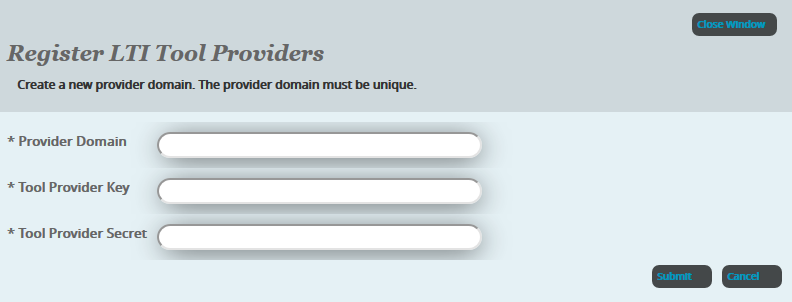
You will need to add Provider Domain by clicking on Add Providers - add the following details for your provider for the LTI tool you are using:
- Provider Domain
- Tool Provider Key
- Tool Provider Secret
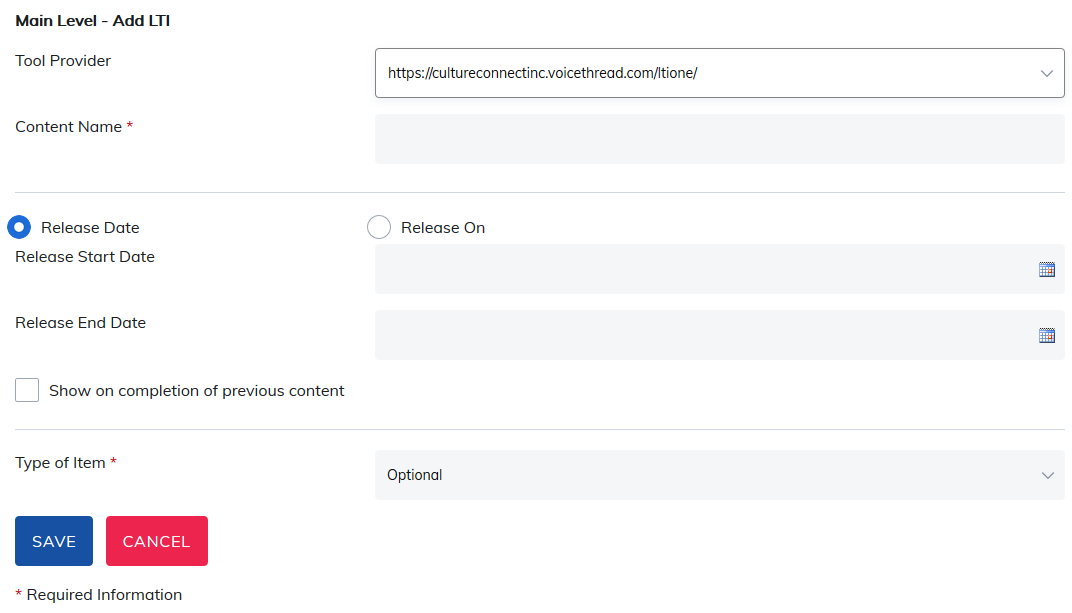
Once your account information has been added, you may add content from LTI Providers to your course. In Manage Course Content, click on Add LTI Content. You will be able to add your provider's content here.

Select your provider and then add the content name. The content will then appear on your site. You may then set your options for this LTI content.
- Release Dates or Timespan: For example 10 days
- Show upon completion of previous content: This option forces your learner to complete items in order. They will not be able to skip around the course.
- Required or Optional: If you are using the optional content setting, you will have the ability to tag items as you add them to the course.
Was this article helpful?
That’s Great!
Thank you for your feedback
Sorry! We couldn't be helpful
Thank you for your feedback
Feedback sent
We appreciate your effort and will try to fix the article