The Power Manager role allows designated users to create child user groups, manage certain learning paths, and create additional managers, depending on the permissions enabled by a system administrator.
Configure Power Manager Permissions
System administrators control power manager capabilities in Site Settings > Manager/Instructor Permissions.
Available options include:
- Allow Power Managers to create other managers: When enabled, power managers can create additional managers, including power managers, marking managers, and managers.
- Allow Power Managers to edit select learning paths: When enabled, power managers can edit approved learning paths, including adding or removing courses and materials.

Assign the Power Manager role
To assign this role to a user:
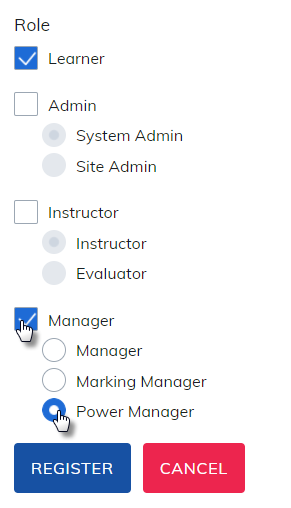
- Check the Manager box for the user.
- Select Power Manager as the manager type.
Learning Path Permissions
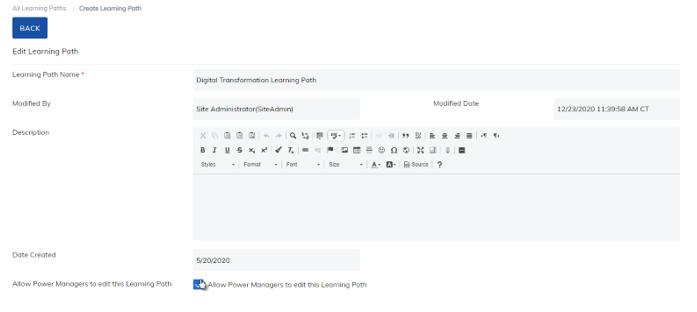
If enabled by an administrator, a power manager can edit any learning path that has Allow Power Managers to Edit the Learning Path selected.
Additionally, when a power manager creates a learning path and enables this setting, other power managers associated with the same groups may also edit that learning path.
User Group Permissions
Power managers can:
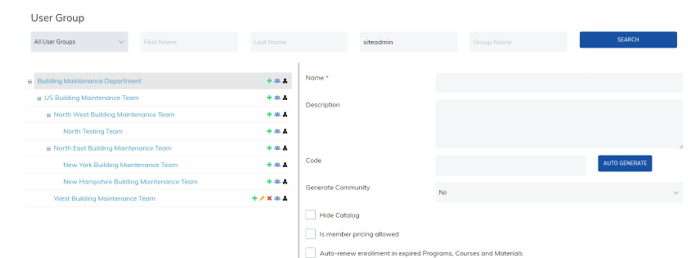
- Create child user groups under their assigned user group
- Assign learners and managers to groups they create
Power Managers cannot edit or delete user groups that they did not create.
Was this article helpful?
That’s Great!
Thank you for your feedback
Sorry! We couldn't be helpful
Thank you for your feedback
Feedback sent
We appreciate your effort and will try to fix the article