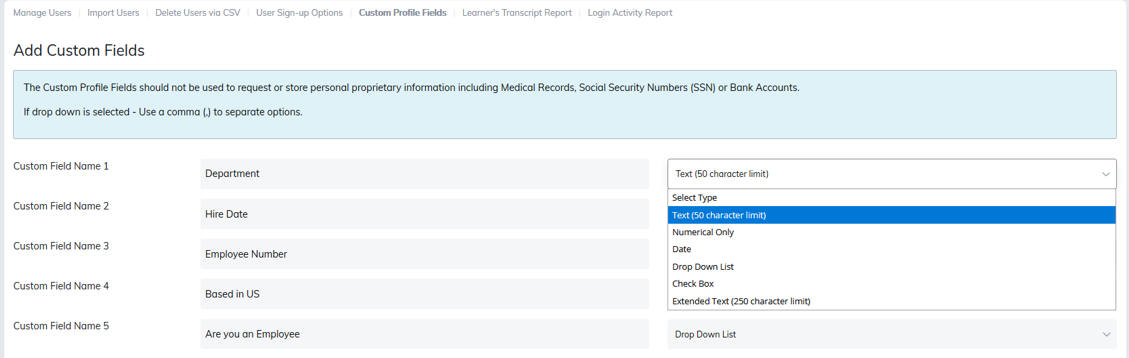
Custom profile fields allow you to capture additional information about users beyond the standard profile details. You can create up to ten (10) custom fields.
To add a custom field:
- Enter the field name in Custom Field Name.
- Select the field type (for example text, numerical, or date) from the Custom Field Type dropdown.
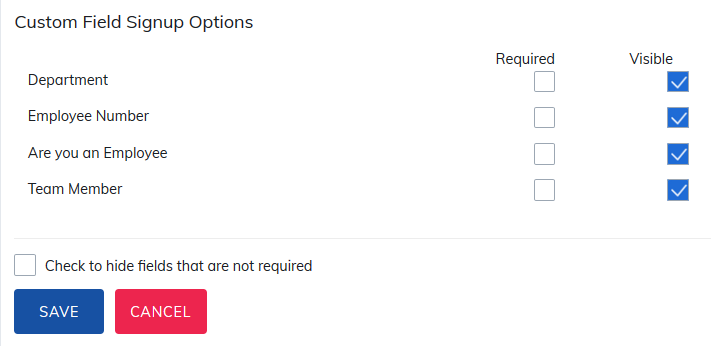
To make a custom field required, go to User Sign Up Options and check the box next to the field name. Users will then be required to complete this field when being added to your site.
When importing custom fields, ensure the CSV header exactly matches the custom field name. For example, if the field is Hire Date, the CSV header must be @Hire Date (not @HireDate or @Hire_Date).
Custom fields appear in both the Manage User Report and the User Registration Report.
Was this article helpful?
That’s Great!
Thank you for your feedback
Sorry! We couldn't be helpful
Thank you for your feedback
Feedback sent
We appreciate your effort and will try to fix the article