The following reports are available under the Administrator Report Tab. Some reports are not available on all TOPYX sites.
Manager and Instructor roles have similar reporting options.
You may customize the view these roles see in reporting on your Reporting panel via the Manager option in the upper right corner of your Admin reporting panel.

Once selected you may by Role determines who sees what on your site's Reporting Panel.
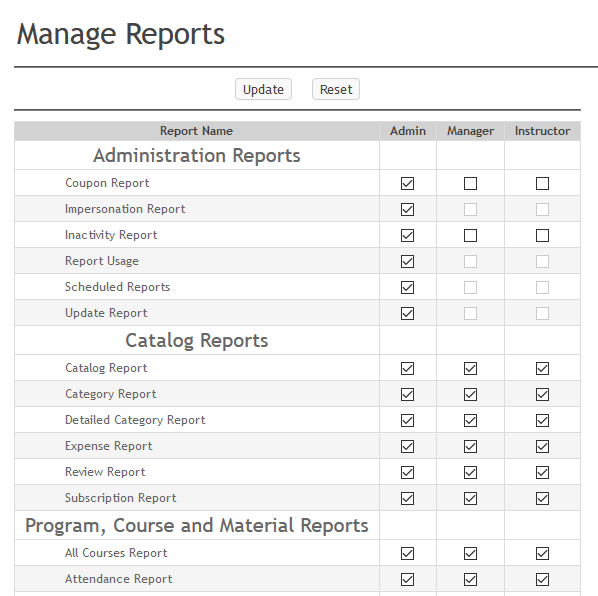
Please remember when viewing in your browsers to enable third party cookies.
Program, Course and Material Reports
| Report Title | Displays |
|---|---|
| All Courses Report | Registration and completion information for courses. |
| Attendance Report | Learners checked as attended in material, course, and program rosters. |
| Certificate Report | Learners who have received certificates for programs, courses, and materials. |
| Competency Report | Courses and materials associated with competencies. |
| Completion Status | Completion status for programs, courses, and materials. |
| Content Audit | Additions/removals and updates that have occurred in programs, courses, and learning paths with the date range selected. |
| Course Completion | Completed courses by learners. |
| Course Content Status | Learners’ status inside courses, reporting on items completed and yet to be completed. |
| Course Overview | All the courses, number of users enrolled, number of users who completed the course and percentage of users who have completed the course. |
| Course Progress | The percentage completion of a learner within a course. |
| Electronic Signature Report | Courses using electronic signatures and learners who confirmed. |
| Emails Sent for Below Grade Threshold | All learners who received emails stating their grade has fallen below the required course threshold. |
| Grade Book | Attempts and completion results for quizzes and assignments created using the quiz and assignment tools. |
| Instructor Course History Report | Reporting for course instructors. |
| Items to be Completed with Programs | Courses and materials all learners with incomplete programs need to complete. |
| Learner Competency Report | Courses and materials needed to be completed to achieve the competency. |
| Learning History Report | Learner course registrations and completions. |
| Learning Path Report | Learning path registrations and completions. |
| Material Completion Report | All attempts and completions of all materials by learners. |
| Material Completion Summary | Percentage completion of each material by user group. |
| Missed Dates in Learning Path | Learners who have missed dates in Learning Paths. |
| Notes Report | Instructors notes in materials, courses, programs, sessions, and subscriptions |
| Overview of Program Status | A summary of learner progress within programs. |
| Permission Request Report | Permission requests and approval status for all materials, courses, and programs requiring approval. |
| Program Completion Report | Learners registration and completion information for the program. |
| Program Content Status | The status of the program content by learner. |
| Program Summary | The number of programs learners have registered for and completed. |
| Quiz Summary Report | A summary of all quiz attempts created in the Topyx quiz tool. |
| Registration Report | Registration data in programs, courses, and materials. |
| Removed from Roster Report | Learners removed from programs, courses, and materials alongside details of this event. |
| SCO Trend Report | The percentage of correct answers for each question sent from 2004 version SCOs. |
| Status in All Registered Items | Learners' status in all registered programs, courses, materials, and external items. |
| Upcoming Expirations | The date that programs, courses, and materials will be expiring. |
User Reports
| Report Title | Displays |
|---|---|
| Badge Report | Badges earned in. |
| Expiration Report | Registration, expiration, and completion dates for all expired programs, courses, and materials. |
| External Data Report | Learners external to Topyx training details. |
| Leaderboard | All active users and their rank according to the number of programs, courses, or materials they completed or the number of hours accredited. |
| Learner Transcript | A copy of all learner transcripts detailing all completed items. |
| Manage User Report | All users in the site. |
| Manager Activity Report | Any changes that managers made, such as user registration, user groups, materials, courses, programs, and learning paths. |
| Manager Report | User groups managed by the manager role. |
| Report Card | Users who have registered for courses and their status in those courses. |
| Report Card with Expired Data | Users who have registered for courses and their status in those courses, including those that have expired. |
| User Group Availability | Spaces remaining in user groups. |
| User Login Report | How many times users have logged in and their last login time. |
| User Registration | The date users were registered to the site alongside the number of times they have logged in. |
| Web Conference Information Report | Registration and attendance information for web conferences. |
Catalog Reports
| Report Title | Displays |
|---|---|
| Catalog Report | Published, enrolled, completions, and user group status for all programs, courses, and materials on the site. |
| Category Report | All Categories and their associations. |
| Detailed Category Report | All Categories with detailed associations. |
| Expense Report | Costs associated with courses. |
| Review Report | Material, courses, and program reviews. |
| Subscription Report | Displays all subscription purchases for eCommerce clients. |
Session Reports
| Report Title | Displays |
|---|---|
| Instructor Course Session History Report | Reporting for course and session instructors. |
| Session Cancellation Report | Reporting for cancelled sessions. |
| Session Expiration Report | Registration and completion date for expired sessions. |
| Session Report | Learner status within course sessions. |
| Session Summary | An overview of course sessions. |
| Unregistered from Session | Learners who have been unregistered from course sessions. |
Site Reports
| Report Title | Displays |
|---|---|
| Community Forum Reports | Forum postings with post details. |
| Community Report | Topics and posts in all communities. |
| Executive Summary Report | Summary statistics for a complete executive summary on all site activity. |
| General Summary Report | The number of users by role. |
| Site Usage | Site usage, role, log-ins, and duration |
| Site Usage By Group | Groups and their usage, including the number of learners, instructors, and managers in their group, along with their duration. |
| Site Usage Detailed Report | Site usage details including names, usernames, groups, log-ins, and duration. |
Administration Reports
| Report Title | Displays |
|---|---|
| Coupon Report | Coupons created on the site and the learners who used them. This only applies to eCommerce sites. |
| Impersonation Report | A log of admins who impersonated learners. |
| Inactivity Report | Learners who have not logged in to your site. |
| Report Usage | The reports which have been generated by users. |
| Scheduled Reports | The Reports which have been scheduled to be exported from your site. |
| Unsuccessful Login Attempts | The date, time, and username for users that were unable to login from the login page. |
| Update Report | Who and when updates have been made to programs, courses, materials, subscriptions, and learning paths that have been updated. |
Was this article helpful?
That’s Great!
Thank you for your feedback
Sorry! We couldn't be helpful
Thank you for your feedback
Feedback sent
We appreciate your effort and will try to fix the article