Add content to a learning path by selecting either Manage Courses or Manage Materials.

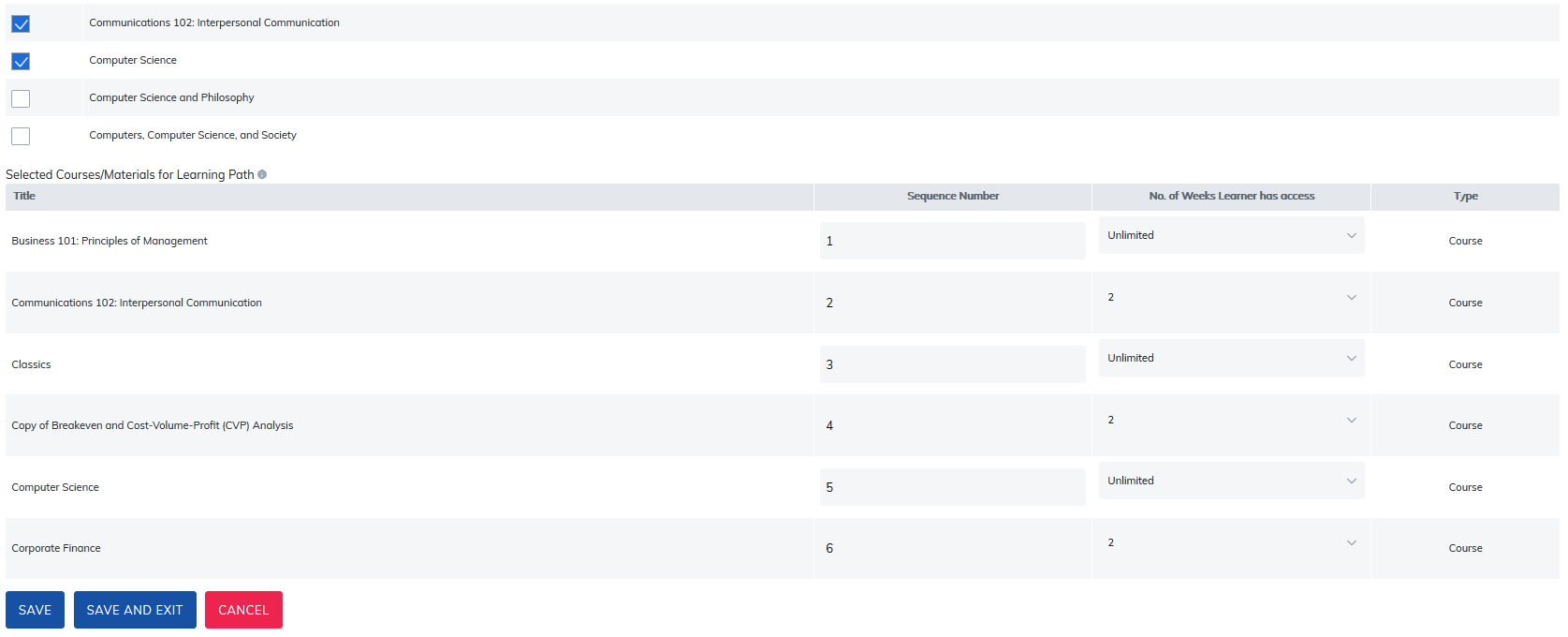
To the left of content list, check mark the box for each item you would like to add. As content is added, two additional options will appear:
- Sequence Number: By adding a number in this field, will dictate the order in which learner's must take each item. The following are specifications for setting a sequence.
- Your Learning Path will have no sequence if all sequence numbers are zero.
- If you choose to give courses or materials a priority of zero, they will automatically be available once a learner is provided their learning path.
- Courses and materials given a sequence number of one will be available once all courses and materials with the sequence number zero have been completed.
- Courses and materials given a sequence number of two will be available once all courses and materials with the sequence number one have been completed.
- Courses and materials given a sequence number of three will be available once all courses and materials with the sequence number two have been completed, and so on.
You can choose to give multiple Courses and Materials the same sequence number. - No. of Weeks Learner has Access: By adding a number in this field, will dictate how many weeks learner's will access to the content.
- As soon as a learner completes Item 1 (for example) they can move to the next item in the sequence. The weeks assigned for access will determine when access is no longer available for each item.
If learners do not complete the item within defined timeline, the Learning Path - Missed Completion Date for Item Notification can be sent to them, if it is turned on in Manage Email Settings section.
Under the Reports tab, use the Missed Dates in Learning Path report to see which learner's missed their dates.
Important Notes
For learners that have completed learning paths, the following will apply if changes are made to learning path content:
- Content is removed from learning path: Learner will still show complete.
- New content is added to learning path: Learner will not show complete and their status bar will update to reflect the added requirements.
Was this article helpful?
That’s Great!
Thank you for your feedback
Sorry! We couldn't be helpful
Thank you for your feedback
Feedback sent
We appreciate your effort and will try to fix the article