To manage Email Settings, navigate to the Admin home page > Manage Email.
Email Management allows you to configure which emails automatically go out on key actions. This includes the usage of a log address, which gets a blind carbon copy of any email that might be triggered.
- Checking the Send to User box will send emails to learners in your site.
- Checking the Send to Supervisor box will send emails to supervisors as listed in a learners profile page.
- Checking the Send to Manager box will send emails to managers identified in this role.
- Checking the Send to Log box and adding up to two email address will send an email to the address(es) for the log email. If you are inserting two email addresses, please separate them with a semicolon.
- Checking the Send Text Message to Users will send text messages to users for specific email templates. Please note that a Twilio account is required and checked in the Publishing Tool settings area of the Admin Panel
Note: If email is turned on, its on for all users. You may edit the default template and you may create custom templates by groups.
Exception: The user registration emails will not go to SSO/API created users even if its turned on in email settings.
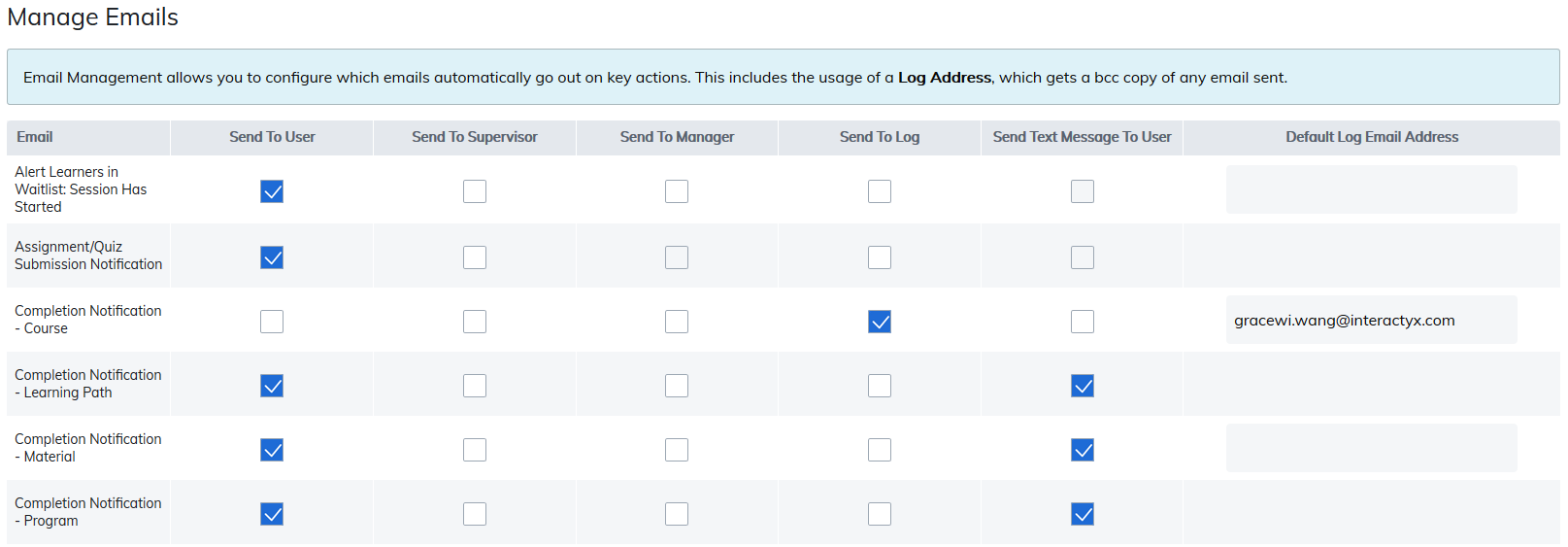
Each email has a specific action which triggers its delivery. Below are descriptions of each of the emails and the action which triggers it.
| When This Email Is Sent | |
|---|---|
| Alert Learners in Waitlist: Session Has Started | Sent to all learners in a course session waitlist once a session has started. |
| Assignment/Quiz Submission Notification | Sent when a learner completes an assignment or quiz. It can be used to notify instructors when assignments are required to be graded for course completion. |
| Completion Notification - Course | Sent when a learner completes a course. |
| Completion Notification - Learning Path | Sent when a learner completes a learning path. |
| Completion Notification - Material | Sent when a learner completes a material. |
| Completion Notification - Program | Sent when a learner completes a program. |
| Course Element Ready Notification | Sent when new content within a course is released. |
| Course Half Completion Notification | Sent when a learner's progress reaches 50% within a course. |
| Drop Notification - Course/Material | When a course is created or a material is published with the option to allow learners to unregister, this email is sent if the learner chooses to drop this course or material. |
| Expired Notification - User Group | Sent when a User group has expired. |
| Expired Notification - Course/Material | Sent when a learner's access to a course or material has expired. |
| Expired Notification - Program | Sent when a learner's access to a program has expired. |
| Expiry Notification - Certificate | Sent one week before a learner's certificate expires. |
| Expiry Notification - Course/Material | Sent one week before a learner's access to a course or material expires. |
| Expiry Notification - Learning Path | Sent when a learner's access to a learning path is about to expire. |
| Expiry Notification - Program | Sent when a learner's access to a program is about to expire. This notifies them of the date their access to this program will expire. |
| Expiry Notification - User Group | Sent when a user group is about to expire. |
| Forgot Password | Sent when a user uses the Forgot Password link on the login page. |
| Instructor has Marked Assignment | Sent when an instructor marks an assignment created using the assignment tool. |
| Item Registration Notification for Courses with Sessions | Sent when a learner registers to a course with sessions. |
| Items Pending In Cart Notification | Sent when a learner adds items to their shopping cart without purchasing. This email is only sent with the eCommerce package. |
| Knowledge Check Ready Notification | Sent when a learner's access to a knowledge check is ready. |
| Learner Grade Below Level Notification | When a course is created with a notification to trigger an email if a learner's grade falls below a certain percentage, using Manage Course Grade, this email will be sent. |
| Learner moved from Wait List to Session Roster | Sent to a learner when they are moved from a waiting list for a course session to joining the session roster. |
| Learning Path - Missed Completion Date for Item Notification | Sent when a learner's access to a course or material within a learning path has expired without completion. |
| Missed Due Date Notification | Sent when a learner does not complete a material, course, or program by the due date set within that content. |
| Password Changed | Sent when an administrator or manager changes a user's password or a learner changes their own password. |
| Program Elective Material Changed Notification | Should an administrator or instructor change the required number of elective courses or materials required to complete a program, this email will trigger notifying learners registered to this program. |
| Publishing Notification | Sent when a calendar event is created using the publishing tool. |
| Purchase Notification | Sent when a learner purchases any item(s) from your catalog. This email is only sent with the eCommerce package. |
| Registration Notification | Sent when a learner registers for a program, course (without sessions), or material. |
| Reminder to Attempt Training Notification | Sent to learners reminding them to start a training they are registered for but have not yet attempted. |
| Report Review Notification | Sent to administrators when a learner reports abuse on a review left by another learner. |
| Request Approval Notification - Program/Course/Material | When a program, course, material is created and requires approval, this email is sent when approval to join this item is granted. |
| Request Notification - Program/Course/Material | When a program, course, or material is created and requires approval, this email is sent to the designated approver of this item when a learner requests to join. |
| Request Rejection Notification - Program/Course/Material | When a program, course, or material is created and requires approval, this email will be triggered when a learner's request to join this item is rejected. |
| Review - A New Review Has Posted | Sent to administrators when a learner leaves a review on a program, course, or material. |
| Review - Report Abuse Notification | Sent to administrators when a learner reports abuse on a review left by another learner. |
| Role Change | Sent when an administrator changes a user's role. |
| Session Cancellation Notification | Sent when a course session is cancelled. |
| Session Notification - New Session | Sent to all learners in waiting lists for a course with sessions when a new session is added. |
| Session Notification - Notification Instructor Assigned to a Session | Notification to alert instructors they have been assigned to a session as a session instructor. |
| Session Notification - Remove User From Wait List | Sent when an administrator or instructor removes a learner from a waiting list for a course session. |
| Session Notification - Session Start Reminder for Instructors | Notification to remind course and session instructors of when a session has an upcoming presentation start date within 7 days. |
| Session Notification - Upcoming Session Presentation | Sent 1 week before the session presentation start date. |
| Session Unregistration Notification | Sent to learners when they are unregistered by administrators, instructors, or themselves from course sessions. |
| Session Waitlist User Registration Acknowledgement Email | Sent when a learner joins a session waiting list. |
| Title Comment Review | Sent to administrators when a learner leaves a review for a material. |
| Training Certificate Expiration Notification | Sent when a learner's training certificate has expired. |
| Training Deadline Missed Notification | Sent to a learner's manager and administrators if the learner misses a deadline within a learning path. |
| User Activation | Sent when a user's account status is changed from deactivated to activated. |
| User Deactivation | Sent when a user's account status is changed from activated to deactivated. |
| User Registration | Sent when a user is created in your site. |
| Web Conference Registration Notification | Sent when a user registers to a web conference created in the web conferencing section from your admin panel. if you have connected your Web Conference Account with your site. |
Was this article helpful?
That’s Great!
Thank you for your feedback
Sorry! We couldn't be helpful
Thank you for your feedback
Feedback sent
We appreciate your effort and will try to fix the article