Admin Reports
- View all Reports available for Administrators - Administrator Report List Summary
- Set up Dashboards - Dashboards
- View all Administrator Report List Features - Report List Features
- Customize your report names and columns for Reports is an option available for your higher user roles - Customize Layout
- Find out more about Filtering, Bookmarking and Exporting - Filtering, Bookmarking and Exporting Reports
Note: To view reporting you will need to enable Third Party Cookies including mobile devices, if you wish to access reporting from them. You will receive an error message if not enabled.
Your Learner Reports
Learners can see a minimum of four (4) reports on all TOPYX sites and up to six (6) reports on an Expanded sites under their "Reports" tab.
- Learner Report Card - after one year of completion, completed programs/courses/materials are removed from Learner's Report Card to just their transcript to keep the report card fresh and easy to navigate.
- Learner Transcript – will have certificate buttons to print certificates for programs, courses and materials.
Note: On the Admin and Manager role - admin tab - Learner's Transcript Report - the manager/admin can also print certificates.
Reports on Phones
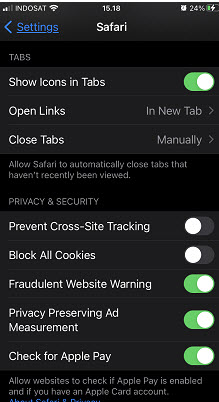
Please note, if you are accessing your reports from phones, and your site does not use an interactyx.com url, there will be a setting you will need to have disabled on iPhones and Androids for Safari browsers.
Please disable Prevent Cross-Site Tracking
Unfortunately, Chrome will not display the reports on phone but will continue to display correctly using desktop browsers.
Was this article helpful?
That’s Great!
Thank you for your feedback
Sorry! We couldn't be helpful
Thank you for your feedback
Feedback sent
We appreciate your effort and will try to fix the article