The Customize Reports Layout feature allows administrators to control which fields appear in a report and how those fields are ordered. This makes it possible to tailor reports to match organizational needs, improve readability, and remove unnecessary data.
When viewing a report, administrators can select Customize Layout to begin editing.
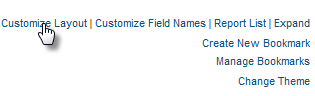
Including or Excluding Fields
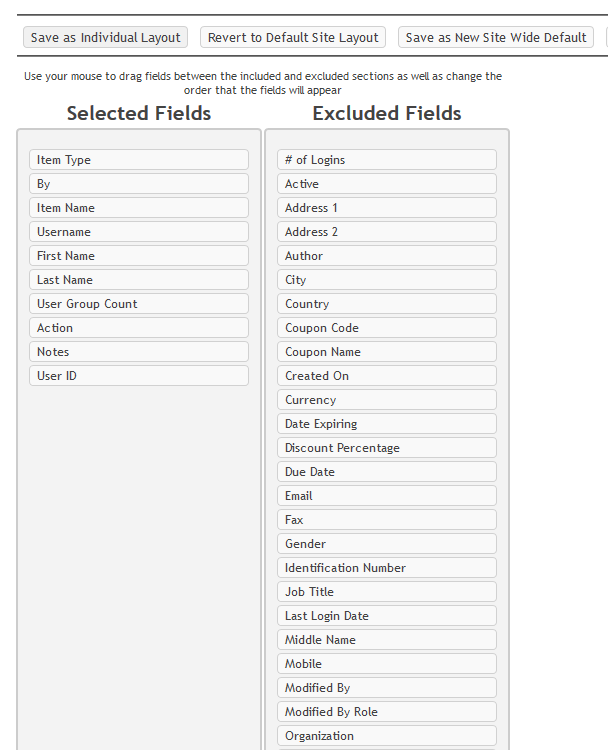
The layout editor displays two columns:
- Selected Fields: Fields currently shown in the report.
- Excluded Fields: Fields not shown in the report
To remove a field from the report, drag it from the Selected Fields column and drop it into the Excluded Fields column.
To add a field back into the report, drag it from the Excluded Fields column into the Selected Fields column.
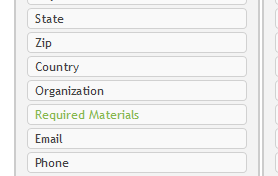
Fields that have been renamed from their original title will appear in green text.
Note: Fields placed in the Excluded column should be positioned directly underneath one another.
Reordering Fields
Administrators can also change the order in which fields appear in the report. To reorder fields:
- Click and drag a field within the Selected Fields column.
- Drop it into the desired position.
For example, if you want username to appear as the second column in the report, drag it into the second position in the Selected Fields list.
The order of fields in the Selected Fields column determines the column order in the report.
Save and Reset Options
After customizing the layout, the following options are available:
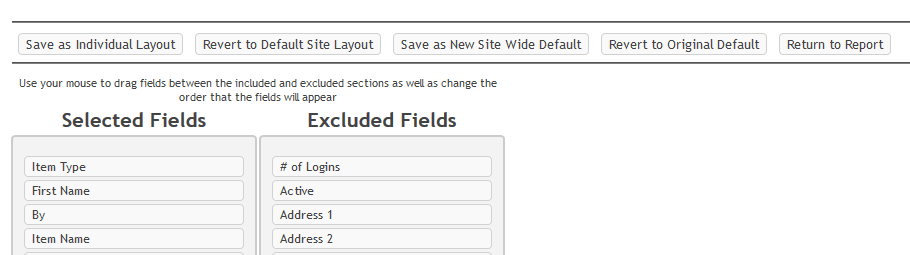
- Save as Individual Layout: Applies the changes only to the current administrator. Other users will not see these changes.
- Save as New Site Wide Default: Applies the changes to all users who have access to the report.
- Revert to Default Site Layout: Removes individual changes and restores the report to the current Site Wide Default layout.
- Revert to Original Default: Removes all customizations and returns the report to its original system default layout.
- Return to Report: Exits without saving changes. The report will remain in its current layout.
Was this article helpful?
That’s Great!
Thank you for your feedback
Sorry! We couldn't be helpful
Thank you for your feedback
Feedback sent
We appreciate your effort and will try to fix the article