Custom Tabs are additional tabs that can be added to a user’s profile page, allowing users to access external websites directly within TOPYX.
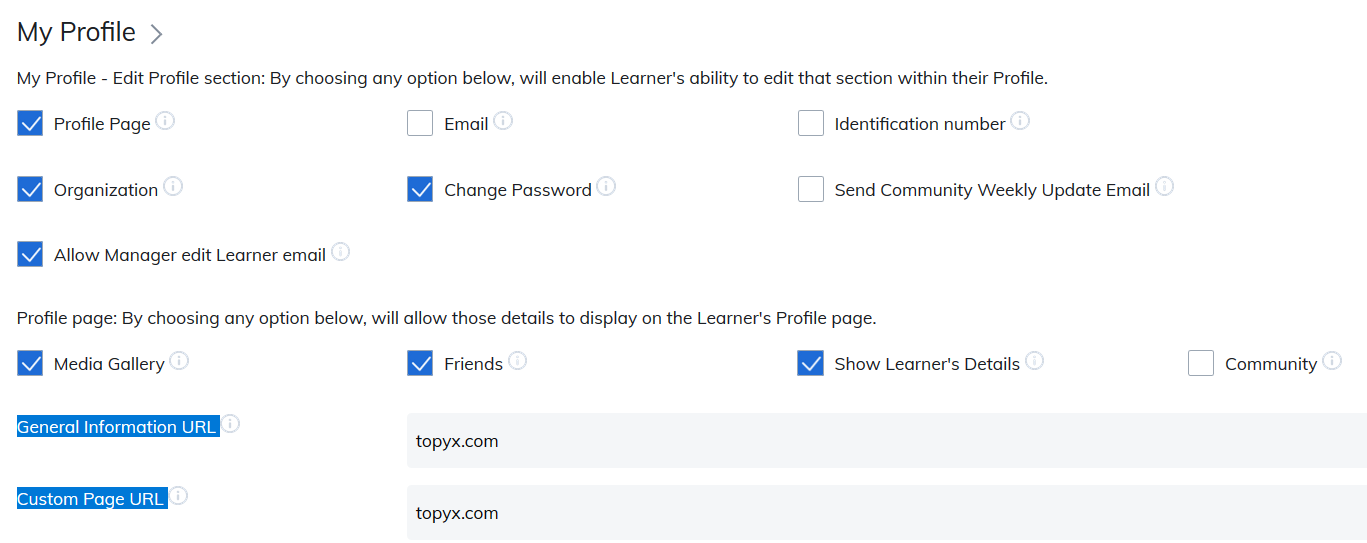
There are two custom tabs available. To enable them for your users:
- Enter the target URLs in Site Settings.
- Name the tabs in Label Settings.
Custom tabs will only appear on the profile page once this information is entered.
The target website opens in an iFrame on the profile page, so users remain on your site while navigating the external content.
For iFrames to work correctly, the security protocols must match. For example, HTTPS content must be loaded into an HTTPS page. We recommend using HTTPS URLs for all custom tabs.
Was this article helpful?
That’s Great!
Thank you for your feedback
Sorry! We couldn't be helpful
Thank you for your feedback
Feedback sent
We appreciate your effort and will try to fix the article