When publishing content created in a course authoring tool, such as Articulate or Captivate, the choices made will determine the data sent from the SCORM Package and the reporting your learners and administrators will see.
1. Make sure to Publish "for an LMS"
2. The options presented when choosing from
What the SCO sends with the following settings:
Tracking: With Quiz
Version: 1.2
Setting: Completed/Incomplete
| Scenario | Completion Status | Success Status | Learner Sees |
|---|---|---|---|
| Partial Completion | Incomplete | Unknown | Incomplete |
| Pass | Unknown | Passed | Complete |
| Fail | Incomplete | Unknown | Incomplete |
Tracking: With Quiz
Version: 1.2
Setting: Completed/Failed
| Scenario | Completion Status | Success Status | Learner Sees |
|---|---|---|---|
| Partial Completion | Incomplete | Unknown | Incomplete |
| Pass | Unknown | Passed | Complete |
| Fail | Incomplete | Unknown | Incomplete |
After setting your publishing settings, as a best practice we aslo recommened testing your SCO in TOPYX and the free SCORM Cloud @ https://cloud.scorm.com/sc/guest/SignUpForm
Your SCO's should play in both TOPYX and the SCORM Cloud. If it doesn't play and track in TOPYX, test in the SCORM Cloud if it doesn't play there either, there is something wrong with the SCO.
How to test that a file is a valid SCO
Here is a series of test to check whether a file is valid SCO or not. In this example, the file is called Balance Sheet.zip.
If any of the following tests fails, then the file is NOT a valid SCO. However even if the file passes all tests, it is not guaranteed that it is a valid SCO.
1. The file needs to be a zip file, with extension .zip
2. When extracting the zip file, there needs to be a manifest file named imsmanifest.xml at the root at the extracted content.
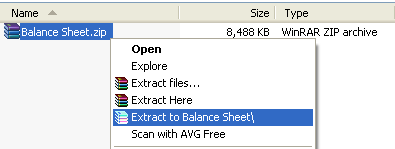
a. To extract the content of the zip file, select the file, then right-click and select “Extract to Balance Sheet\”
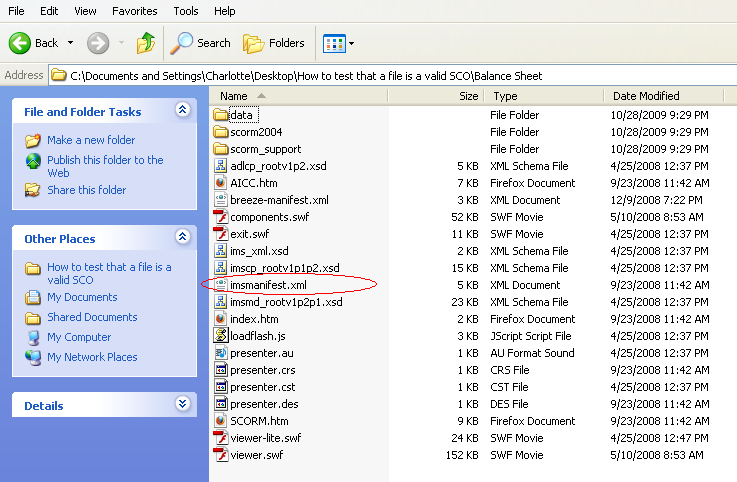
b. Go into the newly created folder “Balance Sheet”
c. There should be a file named imsmanifest.xml in this folder
Was this article helpful?
That’s Great!
Thank you for your feedback
Sorry! We couldn't be helpful
Thank you for your feedback
Feedback sent
We appreciate your effort and will try to fix the article